Website security is an essential but often forgotten part of managing a website. Surprisingly, over 50% of all internet traffic is by spammers, bots, malware and hackers. For this reason we highly recommend you either take steps to protect yourself or if you haven’t already, sign up to our monthly website care package and let us keep you safe and secure.
If your site isn’t protected and secured in line with best practice, it really is only a matter of time before there is a breach. WordPress is a powerful platform but it’s popularity does mean that you will regularly get somebody sniffing around for a way in. If your website is breached and used to send out spam or malicious software, Google may penalise you through no fault of your own.
Keep your software updated
The best way to protect your site is to keep your software updated. The thousands of WordPress developers out there are always hard at work patching any new vulnerabilities and this means that you need to keep your software updated as these are released.
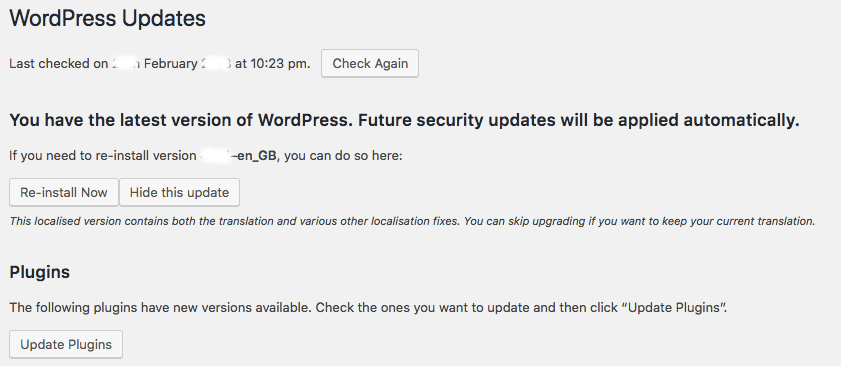
Updating your themes and plugins is really simple, just follow the steps below:
1. When you are logged in to your WordPress website, in the top left hand corner you will see a circle icon and a number – this is how many updates you have to complete.

2. Clicking this will bring up your updates page where you can select and update certain themes and plugins. It is highly recommended to back up your site (see below) before doing anything else as sometimes plugin updates can have unpredictable and negative effects on your website.
User accounts best practice
As with any service you should ensure your website login details are safe and secure. Never create an account called “admin” and if you have one created by default you should delete it. On some installations WordPress creates an account called “admin” and therefore it is often a target for hackers. Equally, make sure your passwords are counted by WordPress to be strong or above – this one should be common sense!
Backing up your website and database
Back ups of your website are another essential part of protecting your site. If the worst happens and you are compromised, or you edit some files and suddenly your website disappears, you can always upload a backup and you’re on your way again. You can do this manually or there are a number of plugins you can use to automate the process like Updraft Plus. Of course if you are signed up to one of our website care packages, we’ll do all of this for you!
If you have any queries, let us know!